Provisioning and Connectivity
This page explains what to click and what each field does. The full SoftAP path for first setup is in Quick start.
SoftAP (web) and BLE (NeoLinker) are one firmware, mutually exclusive at runtime: starting one stops the other.
Entry: Network page
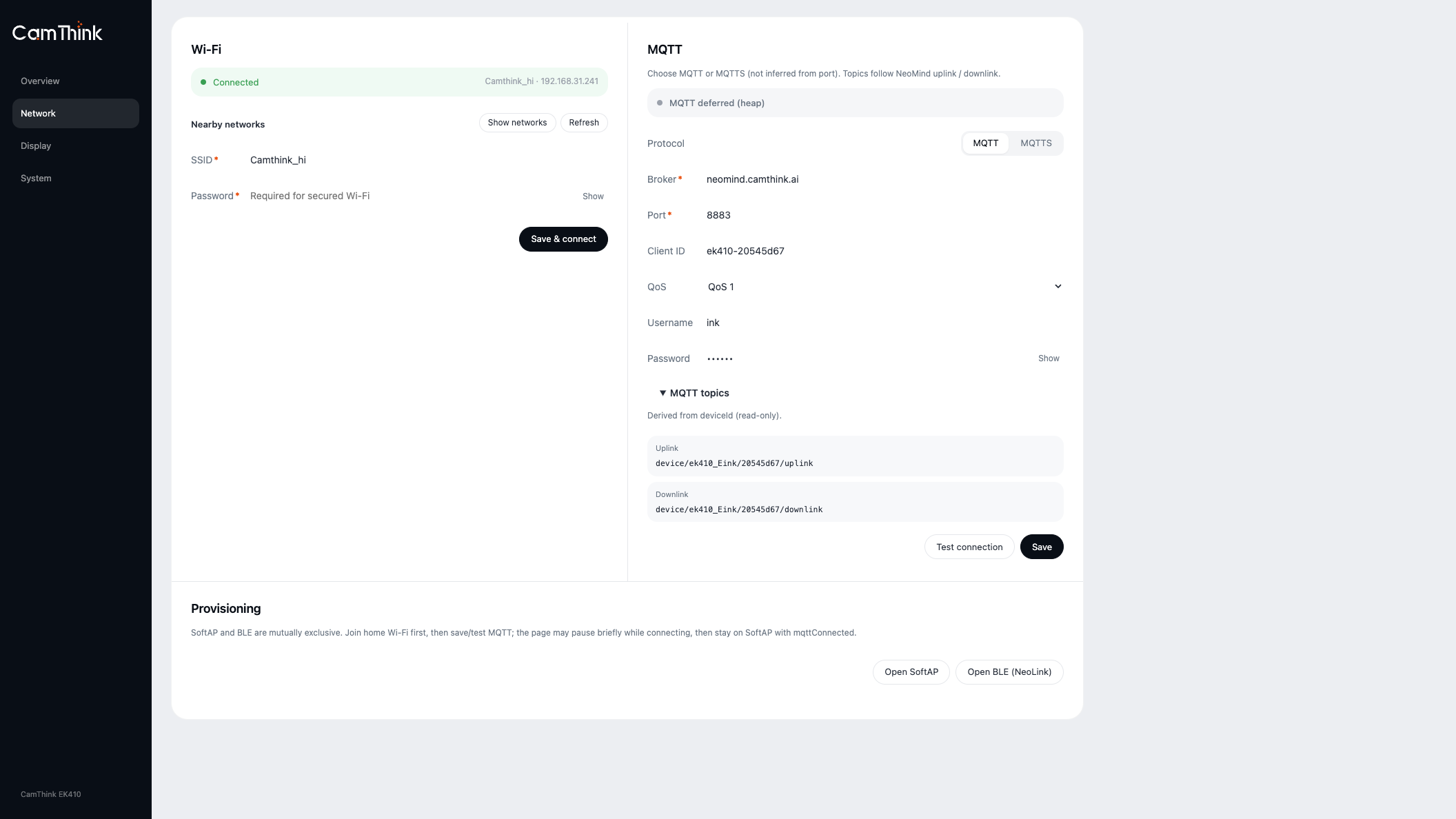
Click Network on the left. Three sections: Wi‑Fi, MQTT, Provisioning.
By default the nearby list is collapsed (only Show networks / Refresh):
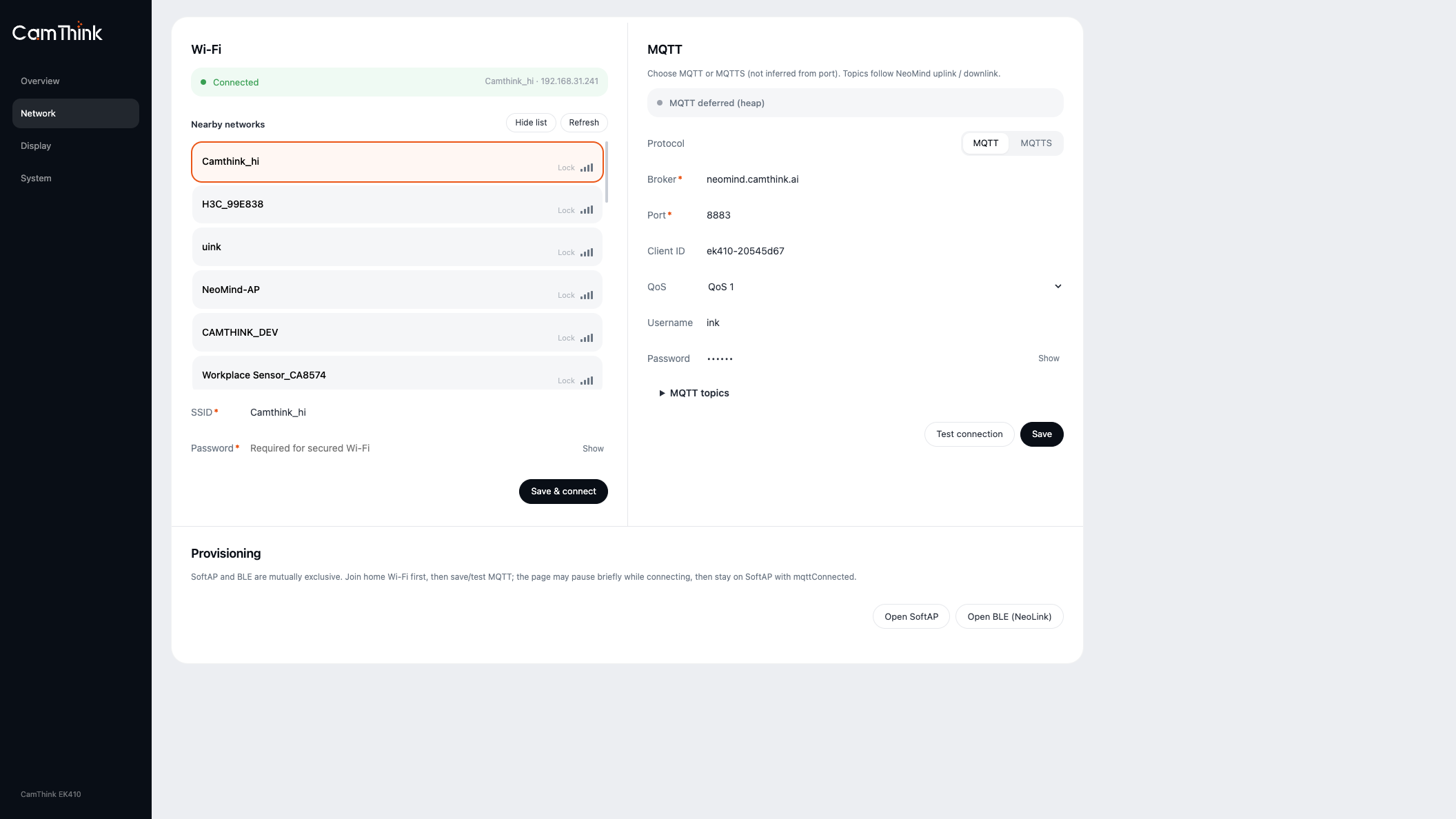
Click Show networks (or Refresh after a successful scan) to expand; tap a row to fill SSID:
SoftAP hotspot (web provisioning)
Open / close
| Method | Action |
|---|---|
| Button | Long-press MAIN ~2.5 s → blue blink; guide page on panel |
| Web | Network → provisioning method → Open SoftAP |
| Close hotspot | Close on banner / provisioning section; or idle timeout |
| API | POST /api/v1/network/openSoftAp / closeSoftAp (may return before toggle completes—poll getDevInfo.softapUp) |
Connection parameters (phone / PC)
| Item | Value |
|---|---|
| Hotspot name | EK410_<MAC6> (SoftAP interface MAC last 3 bytes, uppercase hex; matches panel) |
| Password | 12345678 |
| Browser URL | http://192.168.4.1 (not https) |
| Idle close | ~2 minutes no activity (HTTP access renews timer) |
| Hard cap | ~15 minutes, closes even with clients |
devMacgetDevInfo.devMac is the STA MAC; the hotspot name uses the SoftAP MAC. On ESP32 the SoftAP last octet is usually STA+1 (e.g. STA …:3C → EK410_…3D). Trust the panel / softApSsid, not the STA suffix alone.
While provisioning the device is APSTA: hotspot and home Wi‑Fi can coexist, so you see Save and connect try results in the browser.
Panel after hotspot closes
- If the user never pushed a frame: CamThink logo returns;
- If
lastfrmexists: last user image returns; - Hardware RESET: exits SoftAP / BLE handoff and restores last frame.
BLE CT-Prov (NeoLinker)
For provisioning without joining SoftAP, using the mobile app.
| Step | Action |
|---|---|
| 1 | Long-press PAGE ~2.5 s (or Network → Open BLE (NeoLink)) |
| 2 | LED cyan blink; SoftAP / web server stops |
| 3 | Open NeoLinker; look for advertise name EK410-XXXXXX (hyphen -, SoftAP MAC last 3 bytes — not the underscore SoftAP SSID) |
| 4 | Complete CT-Prov/1 per app |
| 5 | Exit: long-press PAGE again, ~2 min idle, session.close, or long-press MAIN for SoftAP |
openBleProv may pass {idleSec} (CI). Max window same as SoftAP, ~15 minutes. Protocol: docs/ct_prov.md; HTTP can POST JSON to /api/v1/ctprov on STA IP too.
Wi‑Fi: steps and fields
Recommended sequence
- Network → Wi‑Fi card.
- Refresh, pick SSID from list (fills input).
- Enter password; Show to verify.
- Save and connect, watch card header.
- Success: green “Connected” + SSID + IP; failure: fix password (old good config not wiped).
Field reference
| Field / control | Required | Notes |
|---|---|---|
| Nearby networks | — | Refresh to scan; expand/collapse |
| SSID | Yes | 2.4 GHz; manual entry OK |
| Password | Encrypted nets | Never returned on read; empty on same SSID keeps stored password |
| Save and connect | — | ~20 s try-first, NVS only on success; no reboot |
Connection state (Overview / wifiState)
| State | Meaning | Action |
|---|---|---|
| Disconnected / idle | No creds or not connecting | Save Wi‑Fi |
| Connecting | Try in progress | Wait |
| Connected | Has IP | MQTT, push images |
| Reconnecting | Was up, dropped; backoff 1s→60s | Check signal/password; save again |
MQTT: steps and fields
Recommended sequence
- Wi‑Fi must be Connected (test needs STA).
- Protocol: MQTT or MQTTS (match platform; not auto from port).
- Server, port (MQTT 1883, MQTTS 8883 typical).
- MQTTS: Verify certificate default on (system CA); lab self-signed—off or paste custom CA PEM.
- Client ID read-only (
ek410-{deviceId})—do not edit. - QoS usually 1.
- Username / password per platform.
- Expand View MQTT topics, check uplink / downlink.
- Test connection, then Save.
- Approve device in NeoMind device list.
Field reference
| Field | Notes |
|---|---|
| Protocol | Explicit MQTT / MQTTS |
| Verify certificate | MQTTS default on; off for internal lab only |
| Custom CA | Optional PEM; empty = system CA bundle |
| Server / port | Required |
| Client ID | Read-only ek410-{deviceId} |
| QoS | 0 / 1 / 2 |
| Username / password | Optional; password never read back (hasPassword). Empty only if host and username unchanged; changing either clears stored password and may show warn |
| Uplink / downlink topics | Read-only: device/ek410_Eink/{deviceId}/uplink|downlink |
MQTT test on SoftAP
- Must be on home Wi‑Fi (APSTA).
- Page may freeze briefly on save/test—normal; then Overview MQTT badge or
mqttConnected. - On SoftAP prefer save + poll Overview over repeated test clicks.
Command/report formats: MQTT protocol.
FAQ
| Symptom | Check | Fix |
|---|---|---|
| Hotspot not found | MAIN ≥2.5 s, blue LED? 15 min auto-close? Searching by STA MAC? | Long-press MAIN; use panel / softApSsid (SoftAP MAC, often STA last octet +1) |
| 192.168.4.1 no response | Still on device hotspot? Phone on cellular? | Disable mobile data; exit BLE if just opened |
| Wi‑Fi keeps reconnecting | Password, 2.4 GHz, signal, AP isolation | Save and connect again (~20 s try-connect) |
| MQTT fails | Protocol/port, certs, password cleared on host change | Test; re-enter password after host/user change |
| BLE fails | Cyan LED? SoftAP still on? Looking for underscore name? | Close SoftAP; search EK410-XXXXXX (hyphen); reopen BLE after idle |
Related
- Quick start
- HTTP API
- MQTT protocol
- System maintenance (factory reset requires re-provision)