HEF Model Compilation
This page covers static YOLOv8 ONNX → NE503 HEF conversion. Dataset preparation and model training are intentionally omitted.
1. Input Model and Environment
Prepare a trained YOLOv8 detection model with static NCHW input [1, 3, 384, 640] and raw Conv detection-head outputs. safety_helmet_yolov8n_384_640.onnx is only an example filename.
Set the model basename inside the container, without .onnx, .har, or .hef; all following commands use this variable:
MODEL_NAME="<model-name>"
Training is outside this page; if the ONNX is ready, continue to Section 3.
Use Ubuntu x86_64 with an NVIDIA GPU for FineTune. Download and extract the Hailo AI Software Suite 2026-04 Docker environment, then load the image:
docker load -i <package-dir>/hailo_ai_sw_suite_2026-04.tar.gz
Expected output: Loaded image: hailo_ai_sw_suite_2026-04:1. Start the container with the conversion directory mounted:
docker run --platform linux/amd64 --rm -it --gpus all \
  -v "$PWD:/work" -w /work \
  --entrypoint /bin/bash hailo_ai_sw_suite_2026-04:1
Run the commands below inside the container.
If exporting ONNX from a .pt file, install Ultralytics in the host or a separate Python environment; the Hailo Docker image does not include the yolo command.
2. ONNX Export
If starting from best.pt, export a static ONNX model in the Ultralytics environment:
yolo export model=<path>/best.pt \
  format=onnx imgsz=384,640 opset=11 simplify=True dynamic=False
Verify the input is [1, 3, 384, 640] with a static shape and that the outputs are raw Conv detection heads. For the 2-class example:
Input:  name=images,  shape=[1, 3, 384, 640], dtype=float32
Output: name=output0, shape=[1, 6, 5040], dtype=float32
6 = 4 bounding-box coordinates plus 2 class scores. 5040 is the total grid count across the three strides.
3. Hailo HEF Quantization Compilation
The commands below target the 2-class model. The conversion chain is ONNX → HAR → optimized HAR → HEF. If the class count changes, update the NMS classes value and the application's class-name mapping together.
3.1 Prepare the calibration set
Prepare at least 1,024, preferably 2,048, representative images and generate an NHWC, float32, 0–255 .npy calibration set. --calib-set-path accepts .npy, not an image directory; do not use a quick set with fewer than 1,024 images, or DFC may lower its default optimization level. Put calib_2048.npy in the container's /work directory.
import glob
import os
import numpy as np
from PIL import Image

TRAIN_DIR = os.path.expanduser("~/yolo-train/datasets/<dataset>/train/images")
OUT = "calib_2048.npy"
H, W, N = 384, 640, 2048

paths = sorted(glob.glob(os.path.join(TRAIN_DIR, "*.jpg")))[:N]
if len(paths) < N:
    raise RuntimeError(f"need {N} calibration images, found {len(paths)}")
arr = np.zeros((len(paths), H, W, 3), dtype=np.float32)
for i, path in enumerate(paths):
    image = Image.open(path).convert("RGB").resize((W, H))
    arr[i] = np.asarray(image, dtype=np.float32)
np.save(OUT, arr)
print(f"saved {OUT} shape={arr.shape}")
3.2 Parser: ONNX → HAR
Run in /work inside the DFC container. The six --end-node-names must point to the YOLOv8 raw Conv detection heads; replace them for a different graph:
echo n | hailo parser onnx "${MODEL_NAME}.onnx" \
  --hw-arch hailo15h \
  --end-node-names /model.22/cv2.0/cv2.0.2/Conv /model.22/cv3.0/cv3.0.2/Conv \
                   /model.22/cv2.1/cv2.1.2/Conv /model.22/cv3.1/cv3.1.2/Conv \
                   /model.22/cv2.2/cv2.2.2/Conv /model.22/cv3.2/cv3.2.2/Conv
The output is ${MODEL_NAME}.har. NE503 detection requires the HEF to contain yolov8_nms_postprocess; echo n skips the Parser NMS prompt so the .alls file injects NMS exactly once in the next step.
3.3 Optimize: quantization + FineTune
hailo optimize "${MODEL_NAME}.har" \
  --model-script model.alls \
  --calib-set-path calib_2048.npy
model.alls:
normalization1 = normalization([0.0, 0.0, 0.0], [255.0, 255.0, 255.0])
nms_postprocess("nms_config.json", meta_arch=yolov8, engine=cpu)
post_quantization_optimization(finetune, policy=enabled, learning_rate=0.0001, epochs=8, dataset_size=2048)
allocator_param(enable_partial_row_buffers=disabled)
performance_param(optimize_for_power=True)
Keep normalization, NMS, and FineTune settings aligned with the model classes and input size. A successful log should include Using dataset with 2048 entries for finetune, Epoch 1/8 through Epoch 8/8, and Quantization-Aware Fine-Tuning is done.
nms_config.json:
{
  "nms_scores_th": 0.2,
  "nms_iou_th": 0.6,
  "image_dims": [384, 640],
  "max_proposals_per_class": 100,
  "classes": 2,
  "regression_length": 16,
  "background_removal": false,
  "bbox_decoders": [
    {"name": "bbox_decoder41", "stride": 8, "reg_layer": "conv41", "cls_layer": "conv42"},
    {"name": "bbox_decoder52", "stride": 16, "reg_layer": "conv52", "cls_layer": "conv53"},
    {"name": "bbox_decoder62", "stride": 32, "reg_layer": "conv62", "cls_layer": "conv63"}
  ]
}
classes must equal the model class count. Class names are not stored in the HEF; the app maps class IDs using the order in data.yaml. Use the JSON configuration with explicit bbox_decoders; do not rely on auto-detection.
3.4 Compiler: HAR → HEF
hailo compiler "${MODEL_NAME}_optimized.har" --hw-arch hailo15h
Name the compiled artifact ${MODEL_NAME}.hef. After deployment, the filename without .hef becomes the model_id.
3.5 Verify the compile artifact
hailortcli parse-hef "${MODEL_NAME}.hef" | grep -i "nms"
# Expected to include: yolov8_nms_postprocess HAILO NMS BY CLASS, Classes: 2

md5sum "${MODEL_NAME}.hef"
4. Deploy and Verify
- Open the NE503 Web Console and go to AI Models → Import.
- Upload
${MODEL_NAME}.hef. - Set
Model IDto the filename without.hef; setModel Typetohef. - Confirm that the imported model is Loaded.
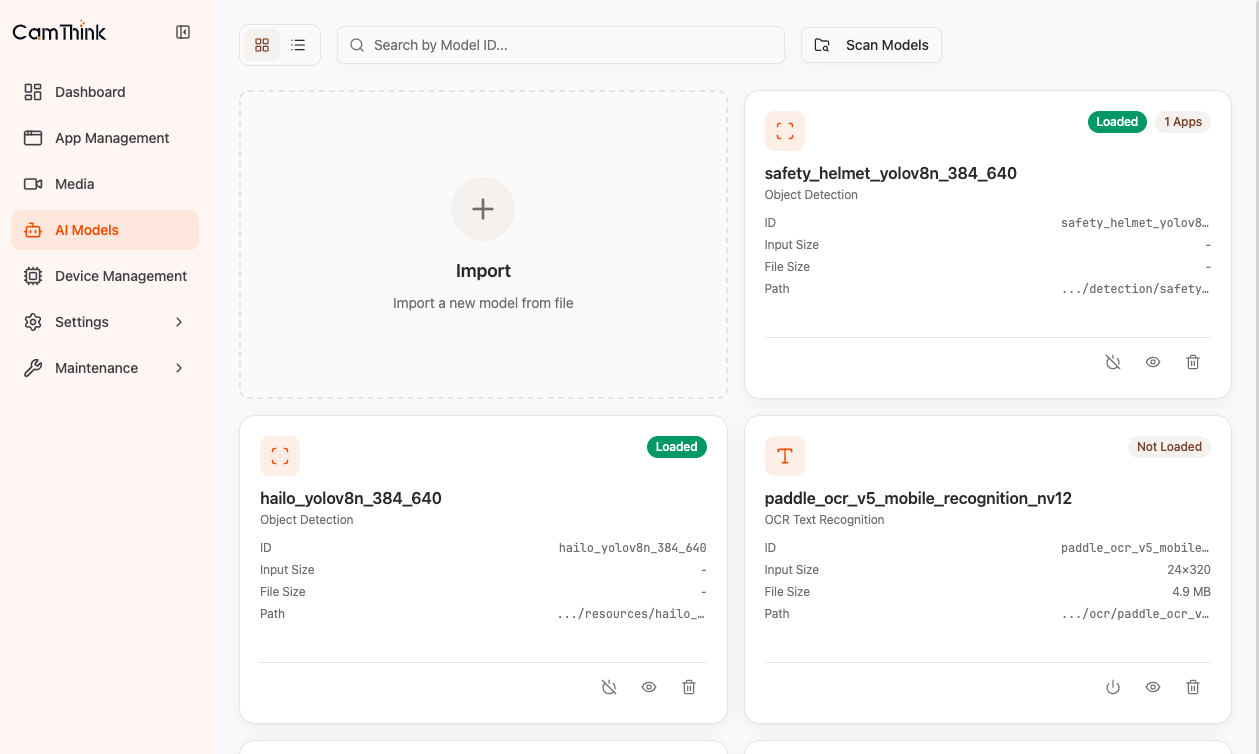
aipc-cli model list
Verification: ${MODEL_NAME} is listed with state Loaded.
5. Output Files
| File | Purpose |
|---|---|
<model>.har | Parser output for Optimize |
<model>_optimized.har | Quantized and FineTune output for Compiler |
<model>.hef | Deployment file for NE503 |