Person Detection
This tutorial deploys a real AI inference application Person Detection, demonstrating the complete workflow: subscribing to video stream inference results via the Python SDK, discovering models and streams on the device, configuring application permissions, and verifying a complete application that publishes detection events and triggers the device light control.
Don't want to build the image yourself? Download the prebuilt package person-detection.tar, unzip it to get app.yaml and image.tar, and follow §5 to deploy to the device.
1. Overview
Person Detection subscribes to the camera video stream and runs AI detection model inference frame by frame. When a person appears in the frame:
- Counts the people and confidence scores;
- Publishes
app/person-detection/detectionandalerts/detectionevents to the event bus (with debounce cooldown); - Triggers the device fill light (
device.set_white_light).
This tutorial is built on the complete sample project in the ne503 source repo. Clone the repo and enter the app directory first:
git clone https://github.com/camthink-ai/ne503.git
cd ne503/apps/person-detection
The directory already contains every file this tutorial needs:
person-detection/
├── app.py             # App logic (SDK subscribe + detection + events + light)
├── app.yaml           # Manifest (permissions/resources/env/thresholds)
├── build.sh           # Build script (copy SDK → buildx → save → .aipc)
├── Dockerfile         # Container build definition
└── requirements.txt   # Python dependencies
The following sections walk through the key parts of each file, and the fields to verify or adjust (stream name, model name, detection threshold).
2. Application Structure and SDK Usage
2.1 Application Source app.py
Below is the full source of Person Detection (i.e. the repo's apps/person-detection/app.py). It does five things: initialize the SDK clients → subscribe to sub stream inference results → filter persons by DETECTION_THRESHOLD → publish structured detection results to the event bus → trigger the fill light when a person is detected; it also handles SIGTERM for graceful exit.
#!/usr/bin/env python3
"""Person Detection Application for AIPC Platform"""
import os
import sys
import time
import signal
import logging
from datetime import datetime
from typing import Optional

# AIPC SDK
from hailo_ipc_sdk import (
    InferenceClient,
    EventClient,
    DeviceClient,
    FdMediaClient as MediaClient,
    Config,
    InferenceResult,
)

logging.basicConfig(
    level=getattr(logging, os.environ.get('LOG_LEVEL', 'INFO')),
    format='[%(asctime)s] [%(levelname)s] %(message)s',
    datefmt='%Y-%m-%d %H:%M:%S'
)
logger = logging.getLogger(__name__)


class PersonDetectionApp:
    """Person Detection Application"""

    def __init__(self):
        self.running = True
        self.app_id = Config.get_app_id()
        self.debug = Config.is_debug()

        # Configuration from environment
        self.detection_threshold = float(os.environ.get('DETECTION_THRESHOLD', '0.2'))
        self.alert_cooldown = int(os.environ.get('ALERT_COOLDOWN_SECONDS', '5'))

        # SDK Clients
        self.inference: Optional[InferenceClient] = None
        self.events: Optional[EventClient] = None
        self.device: Optional[DeviceClient] = None
        self.media: Optional[MediaClient] = None

        # State tracking
        self.frame_count = 0
        self.total_detections = 0
        self.last_alert_time = 0
        self.person_count_history = []

        signal.signal(signal.SIGINT, self._signal_handler)
        signal.signal(signal.SIGTERM, self._signal_handler)

    def _signal_handler(self, signum, frame):
        self.running = False

    def initialize(self) -> bool:
        try:
            self.inference = InferenceClient()
            models = self.inference.list_models()
            logger.info(f"Available models: {[m.model_id for m in models]}")
            if not any(m.model_id == "hailo_yolov8n_384_640" for m in models):
                logger.warning("Required model 'hailo_yolov8n_384_640' NOT found")

            self.events = EventClient()

            try:
                self.device = DeviceClient()
            except Exception as e:
                logger.warning(f"Device control not available: {e}")
                self.device = None

            try:
                self.media = MediaClient()
                available_streams = self.media.list_streams()
                logger.info(f"Available video streams: {available_streams}")
            except Exception as e:
                logger.warning(f"Media client not available: {e}")
                self.media = None

            return True
        except Exception as e:
            logger.error(f"Failed to initialize clients: {e}")
            return False

    def run(self):
        if not self.initialize():
            self._cleanup()
            return 1

        logger.info("Subscribing to stream 'sub' with model 'hailo_yolov8n_384_640'")
        first_frame_received = False

        try:
            # Subscribe to video stream inference results
            for frame_seq, result in self.inference.subscribe(
                stream="sub",
                model="hailo_yolov8n_384_640",
                fps=10,
            ):
                if not self.running:
                    break
                if not first_frame_received:
                    first_frame_received = True
                    logger.info(f"Received first inference result - frame {frame_seq}")
                self._process_frame(frame_seq, result)
        except KeyboardInterrupt:
            pass
        finally:
            if not first_frame_received:
                logger.warning("No inference results - check stream 'sub' and model 'hailo_yolov8n_384_640'")
            self._cleanup()
        return 0

    def _process_frame(self, frame_seq: int, result: InferenceResult):
        self.frame_count += 1
        persons = [
            obj for obj in result.objects
            if obj.label == "person" and obj.score >= self.detection_threshold
        ]
        if persons:
            self.total_detections += 1
            logger.info(f"[Frame {frame_seq}] Detected {len(persons)} person(s)")

        self._publish_detection_event(frame_seq, result, persons)

        # Device control: turn on light when person detected
        if persons and self.device:
            self._trigger_light()

        if self.frame_count % 100 == 0:
            self._print_statistics()

    def _publish_detection_event(self, frame_seq: int, result: InferenceResult, persons: list):
        event_data = {
            "app_id": self.app_id,
            "frame_sequence": frame_seq,
            "timestamp_ns": result.timestamp_ns,
            "timestamp_iso": datetime.now().isoformat(),
            "person_count": len(persons),
            "total_frames_processed": self.frame_count,
            "total_detections": self.total_detections,
            "objects": [
                {
                    "label": obj.label,
                    "confidence": round(obj.score, 3),
                    "bbox": {
                        "x": round(obj.bbox.x, 3),
                        "y": round(obj.bbox.y, 3),
                        "width": round(obj.bbox.width, 3),
                        "height": round(obj.bbox.height, 3),
                    },
                }
                for obj in persons
            ],
        }
        self.events.publish(f"app/{self.app_id}/detection", event_data)

        # Publish alert if cooldown expired
        current_time = time.time()
        if persons and (current_time - self.last_alert_time) >= self.alert_cooldown:
            self.events.publish("alerts/detection", {
                "type": "person_detected",
                "app_id": self.app_id,
                "person_count": len(persons),
                "timestamp": datetime.now().isoformat(),
            })
            self.last_alert_time = current_time

    def _trigger_light(self):
        try:
            self.device.set_white_light(50)
        except Exception as e:
            logger.debug(f"Light control failed: {e}")

    def _print_statistics(self):
        avg = sum(self.person_count_history) / len(self.person_count_history) if self.person_count_history else 0
        logger.info(f"Statistics: frames={self.frame_count}, detections={self.total_detections}, avg_persons={avg:.2f}")

    def _cleanup(self):
        for client in (self.inference, self.events, self.device, self.media):
            if client:
                client.close()


def main():
    sys.exit(PersonDetectionApp().run())


if __name__ == "__main__":
    main()
Key logic reference (the points to adjust when changing the model, stream, or threshold):
| Module | Location | Description |
|---|---|---|
| Config | __init__ | Reads DETECTION_THRESHOLD and ALERT_COOLDOWN_SECONDS from env (defaults 0.2 / 5); actual values are injected by app.yaml's env, see §2.2 |
| Model/stream discovery | initialize | list_models() / list_streams() print the device's real values and verify hailo_yolov8n_384_640 and sub are available |
| Subscribe to inference | run | infer.subscribe(stream="sub", model="hailo_yolov8n_384_640", fps=10) — stream must be sub; main only sends H264 and hangs forever |
| Detection filter | _process_frame | Keeps only targets with label == "person" and score >= threshold |
| Event publishing | _publish_detection_event | Publishes app/person-detection/detection every frame; alerts/detection at most once per cooldown window |
| Light control | _trigger_light | device.set_white_light(50) when a person is detected (50% brightness) |
| Graceful exit | _signal_handler / _cleanup | SIGTERM sets running=False; clients are closed after the loop exits |
2.2 Permission manifest app.yaml
Apps must declare the permissions they need in app.yaml; the platform uses this for container isolation and sandboxing. Person Detection declares: the sub.raw video stream (sub publishes raw NV12 frames for inference; main is RTSP-only), the hailo_yolov8n_384_640 model, event publish/subscribe topics, and device light control.
# AIPC Platform Application Manifest
apiVersion: v1
kind: Application

metadata:
  id: person-detection
  name: Person Detection
  version: 1.0.0
  description: Real-time person detection with AI inference and event publishing
  author: AIPC Team

spec:
  image: aipc/person-detection:1.0.0

  resources:
    cpu: "50%"
    memory: "256Mi"

  permissions:
    video:
      - sub.raw                       # stream publishing raw NV12 frames (main only sends H264, cannot subscribe for inference)
    inference:
      models:
        - hailo_yolov8n_384_640        # must match a model loaded on the device
      max_qps: 30
      max_concurrent: 2
      allow_register_model: false
    events:
      publish:
        - app/person-detection/*
        - alerts/detection
      subscribe:
        - system/*
        - model/*/detections
    device:
      light: true                     # fill-light linkage
      ir_cut: true
    network:
      mode: isolated                  # container network isolation (no outbound)

  # Environment variables: read by app.py via os.environ
  env:
    - name: DETECTION_THRESHOLD
      value: "0.3"                    # person confidence floor; targets below this score are ignored
    - name: ALERT_COOLDOWN_SECONDS
      value: "5"                      # minimum interval (seconds) between alerts/detection events
    - name: LOG_LEVEL
      value: "INFO"                   # log level: DEBUG / INFO / WARNING / ERROR

  volumes:
    - host: /opt/aipc/data/person-detection
      container: /app/data
      readonly: false
    - host: /opt/aipc/logs/person-detection
      container: /app/logs
      readonly: false

  autostart: false
  restart_policy: on-failure
  restart_max_retries: 3

  healthcheck:
    enabled: true
    interval: 30s
    timeout: 5s
    retries: 3
The declarative permission model means: inside the sandbox, the app can only access the resources listed here. Any stream, model, event topic, or device control not declared will be rejected by the platform at call time. See the Application Manifest reference in the repo docs for the full field list.
3. Build the Image
3.1 Build Files
Dockerfile — based on python:3.11-slim-bookworm; installs system deps, bakes the SDK into the image locally, installs app deps, and runs as a non-root user:
FROM python:3.11-slim-bookworm

# System dependencies
RUN apt-get update && apt-get install -y --no-install-recommends \
    bash curl procps libglib2.0-0 libsm6 libxext6 libxrender-dev \
    && rm -rf /var/lib/apt/lists/*

WORKDIR /app

# SDK local install (copied in by build.sh before build)
COPY hailo_ipc_sdk/ /app/hailo_ipc_sdk/
COPY setup.py README.md /app/
RUN pip install --no-cache-dir -e .

# App code and dependencies
COPY app.py /app/app.py
COPY requirements.txt /app/requirements.txt
RUN pip install --no-cache-dir -r requirements.txt

# Non-root user
RUN useradd -m -u 1000 appuser && chown -R appuser:appuser /app
RUN mkdir -p /app/data /app/logs && chown -R appuser:appuser /app/data /app/logs

ENV APP_ID=person-detection
ENV PYTHONUNBUFFERED=1
ENV LOG_LEVEL=INFO

HEALTHCHECK --interval=30s --timeout=5s --start-period=10s --retries=3 \
    CMD python3 -c "from hailo_ipc_sdk import InferenceClient; c = InferenceClient(); c.close()" || exit 1

USER appuser
CMD ["python3", "/app/app.py"]
requirements.txt — only numpy (the SDK already bundles protobuf/grpc):
numpy>=1.21.0
The device's container runtime has no outbound network, so the SDK must be carried into the image. build.sh copies sdk/python/hailo_ipc_sdk/ into the app directory before building; the Dockerfile's COPY hailo_ipc_sdk/ bakes it into the image, then pip install -e . installs it locally.
3.2 Build and Package
The repo's bundled build.sh does "build image → export → package" in one shot — no need to run multiple docker commands manually.
cd apps/person-detection
# arm64 is required: the device is aarch64; an x86_64 image cannot be imported
bash build.sh arm64
build.sh runs 5 steps internally:
| Step | Action | Description |
|---|---|---|
| 1 | Copy SDK | Copies hailo_ipc_sdk/, setup.py, README.md from sdk/python/ into the app directory (the Dockerfile needs them) |
| 2 | Build image | docker buildx build --platform linux/arm64 produces aipc/person-detection:1.0.0 |
| 3 | Export image | docker save exports it as image.tar |
| 4 | Package | zip bundles app.yaml + image.tar into person-detection.aipc |
| 5 | Clean up | Deletes the SDK files from step 1 and the intermediate image.tar, keeping only person-detection.aipc |
Build artifacts:
| Artifact | Size | Description |
|---|---|---|
Docker image aipc/person-detection:1.0.0 | ~434 MB | python:3.11-slim + grpcio/numpy/protobuf, stays in local Docker |
person-detection.aipc | ~97 MB | Final deliverable (zip of app.yaml + image.tar) |
Step 5 of build.sh deletes image.tar, but deploying to the device needs app.yaml and image.tar as two separate files. Unzip the .aipc first to recover them: unzip -o person-detection.aipc.
4. Discover and Configure Models and Video Streams
The model name in subscribe(model=...) (app.py) and the stream name in permissions.video (app.yaml) must use the actual values on your device — do not copy example values verbatim. Names differ across devices and firmware versions; a wrong name fails with StatusCode.NOT_FOUND.
Three steps: query models → query streams → fill the correct values into your app.
4.1 Query models on the device
Device model files live in /opt/aipc/models/; scan and load them to the NPU before first use:
TOKEN="Bearer <token>"   # obtain via /api/login with admin/password

# 1. Scan the model directory and register .hef files with the platform
curl -X POST http://<device-ip>:8080/api/v1/ai/models/scan -H "Authorization: $TOKEN"

# 2. Load a specific model onto the NPU (required before inference)
curl -X POST http://<device-ip>:8080/api/v1/ai/models/hailo_yolov8n_384_640/load -H "Authorization: $TOKEN"

# 3. List currently available models and confirm the model_id
curl http://<device-ip>:8080/api/v1/ai/models -H "Authorization: $TOKEN"
NE503 ships with the detection model hailo_yolov8n_384_640 (YOLOv8n, COCO 80 classes, includes person). Note the real model_id returned by list for the next step.
4.2 Query video streams on the device
The SDK is the most direct way to query stream names (curl has no dedicated stream-listing API). Call it during app.py initialization:
from hailo_ipc_sdk import FdMediaClient as MediaClient
print(MediaClient().list_streams())   # → ['main', 'sub']
NE503 usually has two streams with very different purposes — this difference is central to the configuration that follows.
4.3 Key: inference must use the sub stream
The two streams carry different frame formats, which decides whether a stream can be used for inference:
| Stream | Resolution | Frame format | Inference |
|---|---|---|---|
sub | 720p | raw NV12 | ✅ works (the platform scales to the model input and feeds the NPU) |
main | 4K | encoded H264 | ❌ RTSP viewing only |
The model input resolution should be close to the subscribed stream's resolution. The platform will still resize on a mismatch, but it adds overhead and may hurt accuracy at extreme ratios. You can adjust the sub (and third) stream resolution in the Web Console to match the model input (e.g. 640×384).
subscribe(stream="main") gets no frames at all and hangs indefinitely with no error and no timeout. An app stuck at "Waiting for inference results" is usually this — switch main to sub to resolve it.
Where to fill the values:
| File | Field | Value |
|---|---|---|
app.py | subscribe(stream=...) | sub |
app.yaml | permissions.video | [sub.raw] |
app.py | subscribe(model=...) | the model_id found in §4.1 (e.g. hailo_yolov8n_384_640) |
app.yaml | permissions.inference.models | the same model_id |
5. Deploy to the Device
build.sh produces person-detection.aipc (a zip of app.yaml + image.tar) and deletes the intermediate image.tar at the end. Unzip it into two separate files before deploying:
cd apps/person-detection
unzip -o person-detection.aipc      # extracts app.yaml + image.tar into the current directory
Now you have app.yaml and image.tar. Pick any of the three deployment options:
- Web Console upload (recommended): open the Web Console → App Management → Import → choose Upload Package → upload
app.yamlandimage.tarrespectively → click Install. Fully graphical, no SSH. - aipc-cli (alternative): if already SSH'd in, copy
app.yamlandimage.tarto the device, then runaipc-cli app install app.yaml image.tar. - HTTP two-step upload (alternative): log in from the dev machine for a token →
upload-image(image.tar) →upload-manifest(app.yaml) →install-package(JSON:manifest_path+image_path+force) → pollinstall-progress/<task_id>untilphase=complete.
6. Start and Verify
6.1 Start the app
After deployment the app is in Stopped state; start it once manually. Either option works.
Option 1: Web Console (recommended)
Go to App Management, find the Person Detection card (Stopped), and click Start. The status badge switches from Stopped to Running within a few seconds, and the card starts showing CPU and memory usage.
Option 2: HTTP API
curl -X POST http://<device-ip>:8080/api/v1/apps/person-detection/start -H "Authorization: Bearer <token>"
On first start of a newly deployed app, the platform loads the image into the container runtime, which may exceed the 10-second API timeout and return code:6002 DeadlineExceeded. This is not an error — call start once more (or click Start again in the Web UI) and it succeeds.
6.2 Verify in the Web Console
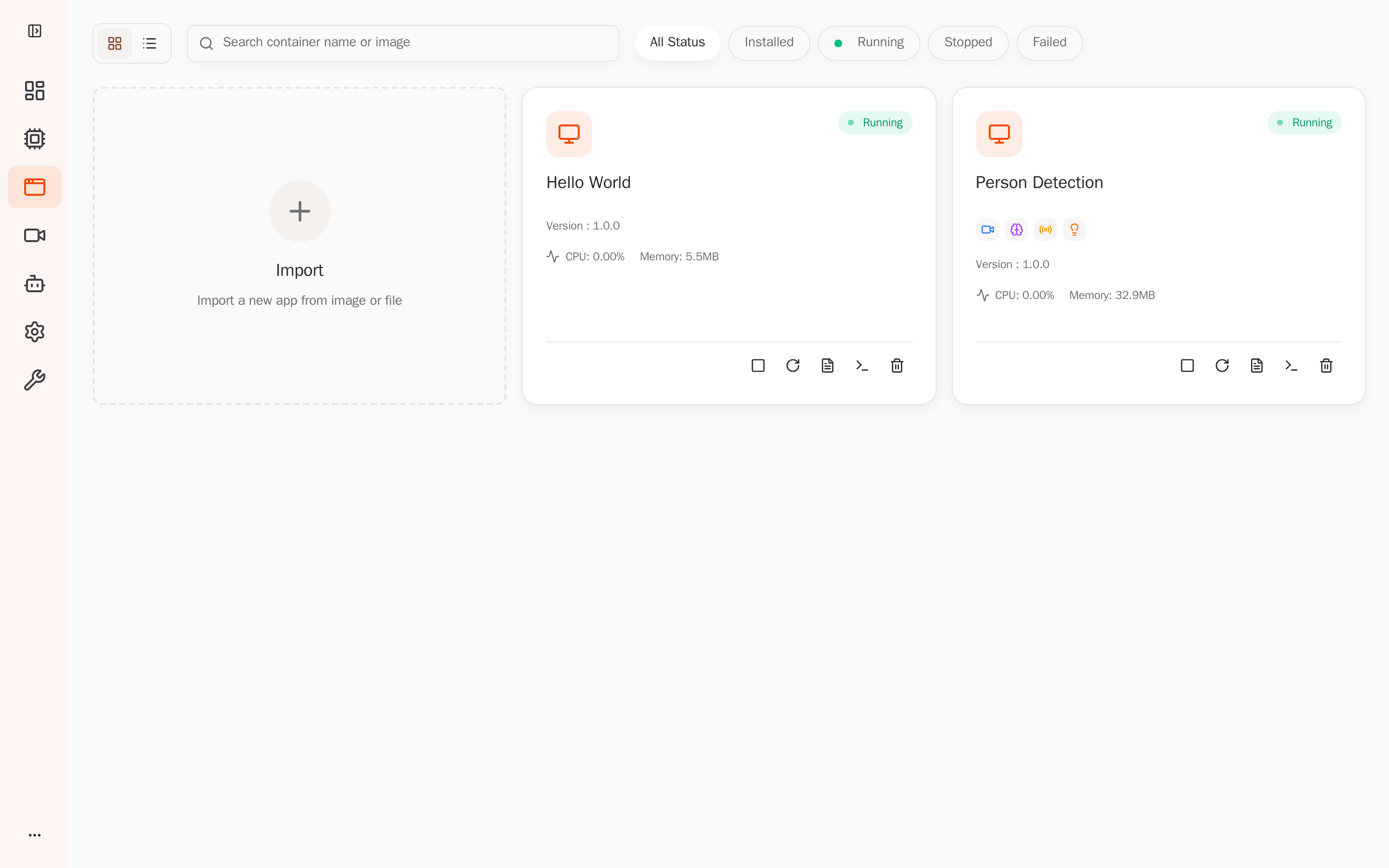
Open the Web Console → Applications; Person Detection is Running, using about 33 MB of memory:
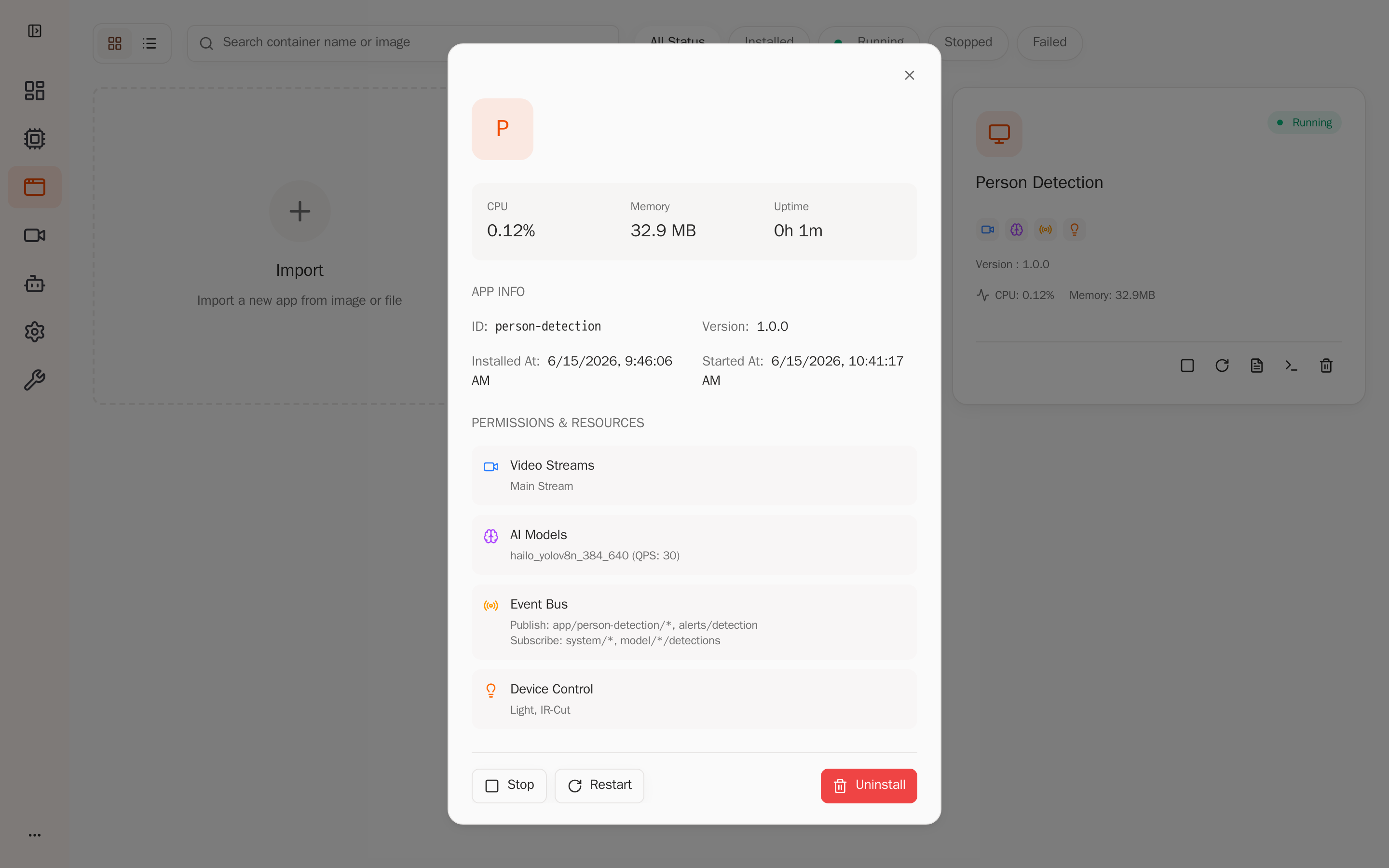
Click Person Detection to open the detail page. The Permissions & Resources area shows the permissions the platform injected per app.yaml — the sub.raw video stream, the hailo_yolov8n_384_640 model (QPS 30), event publish/subscribe topics, and device light control. This confirms the app only has the permissions it declared inside the sandbox:
6.3 View runtime logs and detection output
After the app starts, there are three ways to watch real-time inference results.
Option 1: Web Console Logs live stream
Find Person Detection in the Applications list, click its Logs button to open the Live Stream panel, which scrolls container stdout/stderr in real time — including per-frame detection logs and the per-100-frame statistics:
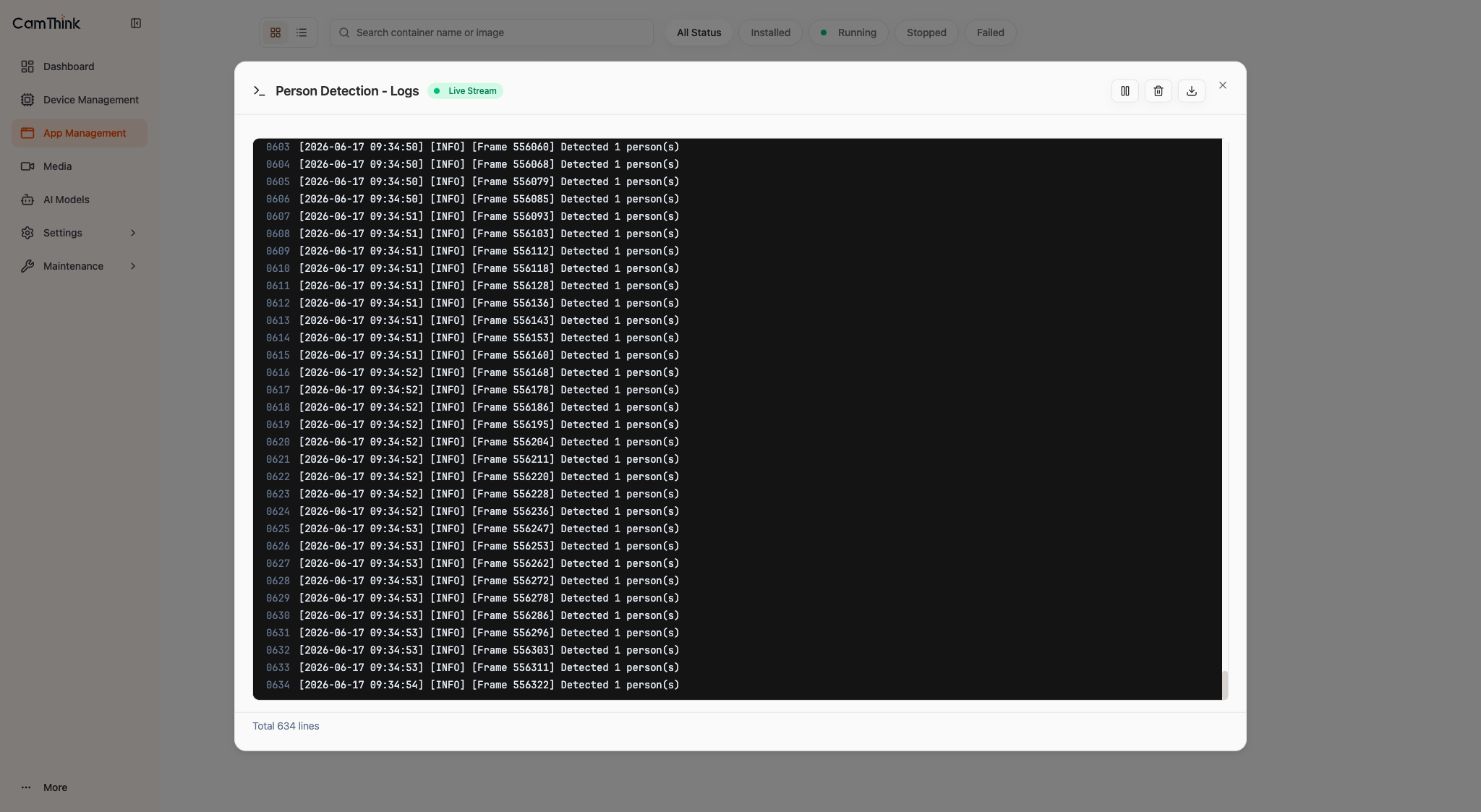
When a person is in frame, [Frame N] Detected M person(s) lines refresh continuously, and the Statistics detections and avg_persons grow accordingly — the most intuitive evidence that the inference pipeline is actually running.
Option 2: HTTP API to pull recent logs
curl "http://<device-ip>:8080/api/v1/apps/person-detection/logs?max_lines=15" -H "Authorization: Bearer <token>"
[INFO] Available models: ['hailo_yolov8n_384_640']
[INFO] Available video streams: ['main', 'sub']
[INFO] Subscribing to stream 'sub' with model 'hailo_yolov8n_384_640'
[INFO] Received first inference result - frame 1
[INFO] [Frame 142] Detected 1 person(s)
[INFO] Statistics: frames=200, detections=198, avg_persons=1.00
detections growing with frames and avg_persons near 1.0 means the inference pipeline is actually running.
Option 3: Subscribe to structured detection results on the event bus
The app packages each detection's confidence, bbox, and person count into a structured JSON published to the event bus. Subscribe via CLI on the device:
aipc-cli event subscribe 'app/person-detection/*'
{"app_id":"person-detection","frame_sequence":142,"person_count":1,
 "confidence":0.879,"bbox":{"x":0.31,"y":0.22,"width":0.27,"height":0.61},
 "total_detections":1118}
If any of the three shows live output, the SDK clients initialized successfully, the model and sub stream are available, and inference is subscribed and running.
If Web Logs reports no log file found for container aipc-person-detection, the device's root partition is likely full. SSH in and check with df -h /; as a quick fix, truncate -s 0 /opt/aipc/logs/*.log to clear oversized platform logs, then reinstall the app.
7. Summary
This tutorial covered the end-to-end deployment of a real AI inference application:
- SDK calls —
InferenceClient.subscribefor streaming inference,EventClient.publishfor events,DeviceClientfor hardware linkage - Resource discovery —
list_models()/list_streams()to find real names and fill them intoapp.pyandapp.yaml - Permission declaration —
app.yaml'spermissionsdefines the sandbox capabilities; the platform isolates strictly by it - Deploy and verify — confirm Running + permission injection in the Web Console, and confirm the inference pipeline via logs
Next steps: explore other examples under the repo's apps/ directory (people-counting, object-detection, parking-lot, etc.) to develop your own applications.