DeepStream Multi-Stream Video Analytics on NG4500
Multi-stream RTSP video analytics on NG4500 (Jetson Orin) — a single box handles 2–32 cameras with HW decode + inference + tracking, emitting business events and re-publishing annotated RTSP.
1. Solution Overview
The deepstream extension wraps the NVIDIA DeepStream 7.1 SDK (a GStreamer-based video-analytics pipeline) for multi-stream RTSP inference on Jetson. The typical deployment: NeoMind on a Mac/PC, the sidecar on the NG4500, bridged over TCP.
Core capabilities:
- Multi-stream RTSP: 2–32 concurrent 720p/1080p streams on a single Jetson Orin NX 8G.
- Hardware pipeline: NVDEC → TensorRT → tracker (NvDCF/NvSORT) → nvdsanalytics → OSD → NVENC, zero-copy.
- Business analytics: line crossing, ROI intrusion, bidirectional counting, dwell time.
- Annotated output: RTSP stream with detection boxes / track IDs / analytics overlays, plus browser-friendly MJPEG thumbnails and JPEG snapshots.
- Event-driven: Detection / LineCross / ROIIntrusion / AnalyticsSnapshot pushed to the NeoMind EventBus to drive dashboards and automation.
Data Flow:
Live demo (multi-stream RTSP inference + tracking + business-event overlay):
2. Bill of Materials (BOM)
| Item | Spec | Purpose | Required |
|---|---|---|---|
| NeoMind platform | v0.9.0+ | Runs on Mac/PC, hosts the extension | ✅ |
| deepstream extension | v2.8.0+ | Remote bridge + event routing | ✅ |
| NG4500 | Jetson Orin NX/Nano/AGX, JetPack 6.x, DeepStream 7.1 | Runs the DeepStream sidecar | ✅ |
| RTSP cameras | 2–32 × 720p/1080p | Video sources | ✅ |
| Network | NeoMind ↔ NG4500 reachable (TCP 9556, etc.) | Remote bridge | ✅ |
3. Deploy the DeepStream Runtime (NG4500)
The deepstream extension's Python sidecar runs on Jetson only (the DeepStream SDK is Jetson-only). Deploy it once on the NG4500 in six steps. For OS-level DeepStream SDK install details see the NG4500 DeepStream guide; the extension's most complete steps are in INSTALL.md.
Run everything on the NG4500 as a normal user; Docker commands rely on
nvidia-container-runtime(bundled with JetPack).
3.1 Verify the system
| Item | Requirement | Check |
|---|---|---|
| JetPack / L4T | R36.4.3 (JetPack 6.1 GA) | cat /etc/nv_tegra_release |
| Kernel | 5.15.x-tegra | uname -r |
| Free disk | ≥ 20 GB | df -h /var/lib |
| Memory | ≥ 8 GB (validated on Orin NX 8GB) | free -h |
3.2 Install DeepStream SDK 7.1
The official Debian package is the easiest path. Install the dependencies first:
sudo apt update
sudo apt install -y libssl1.1 libgstreamer1.0-0 gstreamer1.0-tools \
  gstreamer1.0-plugins-good gstreamer1.0-plugins-bad gstreamer1.0-plugins-ugly \
  gstreamer1.0-libav libgstrtspserver-1.0-0 libjansson4 libyaml-cpp-dev
Download deepstream-7.1_7.1.0-1_arm64.deb from NGC, then install:
sudo apt-get install ./deepstream-7.1_7.1.0-1_arm64.deb
sudo ldconfig
Verify:
deepstream-app --version-all
# deepstream-app version 7.1.0 / DeepStreamSDK 7.1.0 / CUDA 12.6 / TensorRT 10.3
tar / SDK Manager and other install options: NG4500 DeepStream guide §3.
3.3 Configure Docker
Two kernel quirks must be handled first, or containers retry endlessly or lose networking.
① Switch the storage driver to vfs — the kernel's overlayfs mishandles whiteout files in containers, making Docker retry and fill the disk:
sudo tee /etc/docker/daemon.json <<'EOF'
{
  "storage-driver": "vfs",
  "default-runtime": "nvidia",
  "runtimes": {
    "nvidia": { "path": "nvidia-container-runtime", "runtimeArgs": [] }
  }
}
EOF
sudo systemctl restart docker
② Always use --network=host — the kernel lacks the iptable_raw module, so Docker bridge networking fails. Every docker run in this guide uses host networking.
③ Log in to NGC (required to pull the base image). Create an API key at NGC, then:
echo "$YOUR_NGC_KEY" | docker login nvcr.io -u '$oauthtoken' --password-stdin
$oauthtokenis literal — keep the$and single-quote it to prevent shell expansion.vfsdoes no layer dedup; rundocker image prune -fregularly.
3.4 Build the sidecar image ds:7.1-pyds-gi
Pull the Jetson-specific base image (not the :7.1 datacenter variant, which lacks Jetson libs):
docker pull nvcr.io/nvidia/deepstream:7.1-samples-multiarch
docker tag nvcr.io/nvidia/deepstream:7.1-samples-multiarch ds:7.1-base
Get the pyds 1.2.0 wheel (matches DS 7.1 / Python 3.10):
wget https://github.com/NVIDIA-AI-IOT/deepstream_python_apps/releases/download/v1.2.0/pyds-1.2.0-cp310-cp310-linux_aarch64.whl
# If the filename has cp310 only once (common when downloaded from NGC), add the second ABI tag,
# or pip rejects it per PEP 427:
# cp pyds-1.2.0-cp310-linux_aarch64.whl pyds-1.2.0-cp310-cp310-linux_aarch64.whl
Place Dockerfile.sidecar in the same dir (layers Python GI bindings on top of pyds):
FROM nvcr.io/nvidia/deepstream:7.1-samples-multiarch

RUN apt-get update && apt-get install -y --no-install-recommends \
        python3-gi python3-gst-1.0 libpython3.10 python3-pip \
    && rm -rf /var/lib/apt/lists/*

COPY pyds-1.2.0-cp310-cp310-linux_aarch64.whl /tmp/
RUN pip3 install --no-cache-dir /tmp/pyds-1.2.0-cp310-cp310-linux_aarch64.whl \
    && rm /tmp/*.whl

WORKDIR /srv/sidecar
Build and verify pyds loads:
docker build --network=host -t ds:7.1-pyds-gi -f Dockerfile.sidecar .
docker run --rm --runtime=nvidia --network=host ds:7.1-pyds-gi \
    python3 -c "import pyds; print('pyds', pyds.__version__)"
3.5 Pre-build the TensorRT FP16 engine
On Orin NX 8GB, letting
nvinferbuild an INT8 engine at startup OOMs during tactic selection. Always pre-build an FP16 engine withtrtexecso runtime only deserializes.
mkdir -p ~/ds-engines
docker run --rm --runtime=nvidia --network=host \
    -v ~/ds-engines:/engines ds:7.1-pyds-gi \
    trtexec \
        --onnx=/opt/nvidia/deepstream/deepstream/samples/models/Primary_Detector/resnet18_trafficcamnet_pruned.onnx \
        --saveEngine=/engines/trafficcam_fp16.engine \
        --fp16 --memPoolSize=workspace:1024
~3 s to produce a ~4 MB engine. TensorRT 10.3+ deprecates --workspace; use --memPoolSize.
trtexecdefaults tobatch-size=1; the sidecar'spipeline_builder.pyforces nvinferbatch-size=1to match. Keep batch sizes aligned in custom configs or nvinfer triggers a rebuild back into the OOM trap.
3.6 Prepare an RTSP test source (mediamtx + ffmpeg)
Without real cameras, loop a sample video as RTSP. Install mediamtx (ARM64v8, from releases):
tar xf mediamtx_v*.linux_arm64v8.tar.gz
./mediamtx &          # listens on 8554
Publish four test streams:
for i in 1 2 3 4; do
    ffmpeg -re -stream_loop -1 -i sample.mp4 -c copy \
        -f rtsp rtsp://localhost:8554/in/stream$i &
done
RTSP must use TCP (
protocols=tcp). UDP fails because the kernel'smultiudpsinkcan't resolve IPv6 localhost —Invalid address family (got 10).
4. Start the sidecar on the NG4500
Four services must be resident on the NG4500:
| Service | Port | Purpose |
|---|---|---|
mediamtx | 8554 (RTSP) | RTSP relay — receives input streams and DeepStream's annotated output, serves them to clients |
ffmpeg test source | — | Loops a sample video as RTSP (for testing; replace with real camera URLs in production) |
mjpeg_server.py | 8090 (HTTP) | Converts RTSP output to MJPEG for browser thumbnails |
sidecar_bridge.py | 9556 (TCP) | Bridge daemon between NeoMind and the Docker sidecar |
4.1 One-shot start (recommended)
The extension does not ship a ready-made one-click script: create start_all.sh yourself on the Jetson (e.g. under ~/ds-deps/) using the script content given in the extension README. It brings up mediamtx, the test source, the MJPEG server, and the bridge daemon in order — the bridge then spawns the container:
./start_all.sh
The bridge daemon starts the ds:7.1-pyds-gi container with --runtime=nvidia --network=host, running deepstream_runner.py.
4.2 Start the sidecar container manually (for debugging)
Copy the sidecar source to the device (in production the .nep package installs it under ~/.neomind/extensions/deepstream/sidecar/, located via NEOMIND_EXTENSION_DIR):
scp -r extensions/deepstream/sidecar box@<jetson-ip>:~/ds-deps/
Prepare the JSONL control input (hello to register + add_stream for one test stream):
cat > ~/ds-deps/data-plane.jsonl <<'EOF'
{"id":"0","type":"hello","version":"1.0","capabilities":["streams","events"],"pid":12345,"rtsp_port":8554,"snapshot_port":8555,"log_level":"info","models_dir":"/opt/nvidia/deepstream/deepstream/samples/models","max_streams":4,"snapshot_bind_addr":"0.0.0.0"}
{"id":"1","type":"add_stream","config":{"stream_id":"test-1","source":{"type":"rtsp","url":"rtsp://localhost:8554/in/stream1","rtsp_transport":"tcp","latency_ms":200},"model":"Primary_Detector"}}
EOF
Start the container (feed the JSONL; send shutdown after 60 s for easy observation):
docker run --rm -i --runtime=nvidia --network=host \
    -v ~/ds-deps/sidecar:/srv/sidecar:ro \
    -v ~/ds-deps/data-plane.jsonl:/srv/data-plane.jsonl:ro \
    -v ~/ds-engines:/engines:ro \
    ds:7.1-pyds-gi \
    bash -c "(cat /srv/data-plane.jsonl; sleep 60; echo '{\"id\":\"2\",\"type\":\"shutdown\",\"graceful_secs\":3}') | timeout 90 python3 /srv/sidecar/deepstream_runner.py"
models_dirmust not end with/— a trailing slash breaksos.path.dirname()path resolution.
4.3 Verify
The sidecar emits JSONL on stdout; you should see, in order:
hello_ack— registration succeeded, withmax_streamsand the RTSP prefixrtsp://0.0.0.0:8554/ds/;stream_added— the stream is ready, with its full RTSP URL (e.g.rtsp://0.0.0.0:8554/ds/test-1);Detection— per-frame inference results.
Test-source connectivity:
ffprobe -v error rtsp://127.0.0.1:8554/sample # expect h264
With the four services up, head back to NeoMind to configure the remote sidecar (next section).
5. Configure the NeoMind extension (remote mode)
After installing the deepstream extension in NeoMind, switch it to remote mode in Configuration and point it at the NG4500:
| Parameter | Value | Description |
|---|---|---|
sidecar_mode | remote | Sidecar runs on a remote NG4500 (not a local child process) |
sidecar_host | NG4500 IP | Remote bridge address |
sidecar_port | 9556 | Bridge TCP port |
server_host | same NG4500 IP | Used by the frontend to build preview / RTSP URLs |
rtsp_port | 8554 | Annotated RTSP output port |
snapshot_port | 8555 | Snapshot HTTP port |
max_streams | 32 | Concurrent stream cap (1–64) |
models_dir | DeepStream sample models dir | Model files location |
On save, the extension connects to the sidecar over TCP.
Install and configure (open the marketplace → install the extension → switch to remote mode):
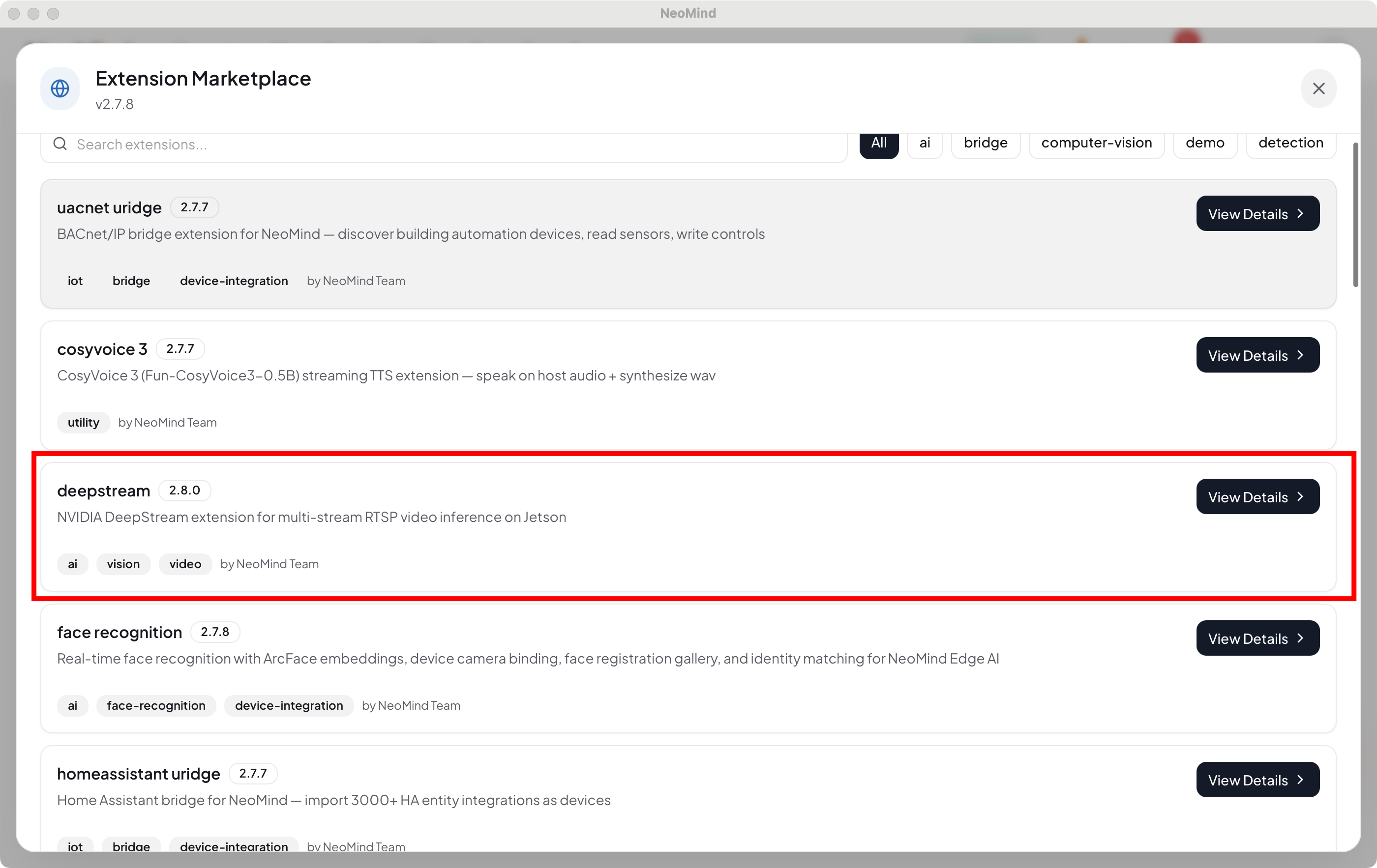
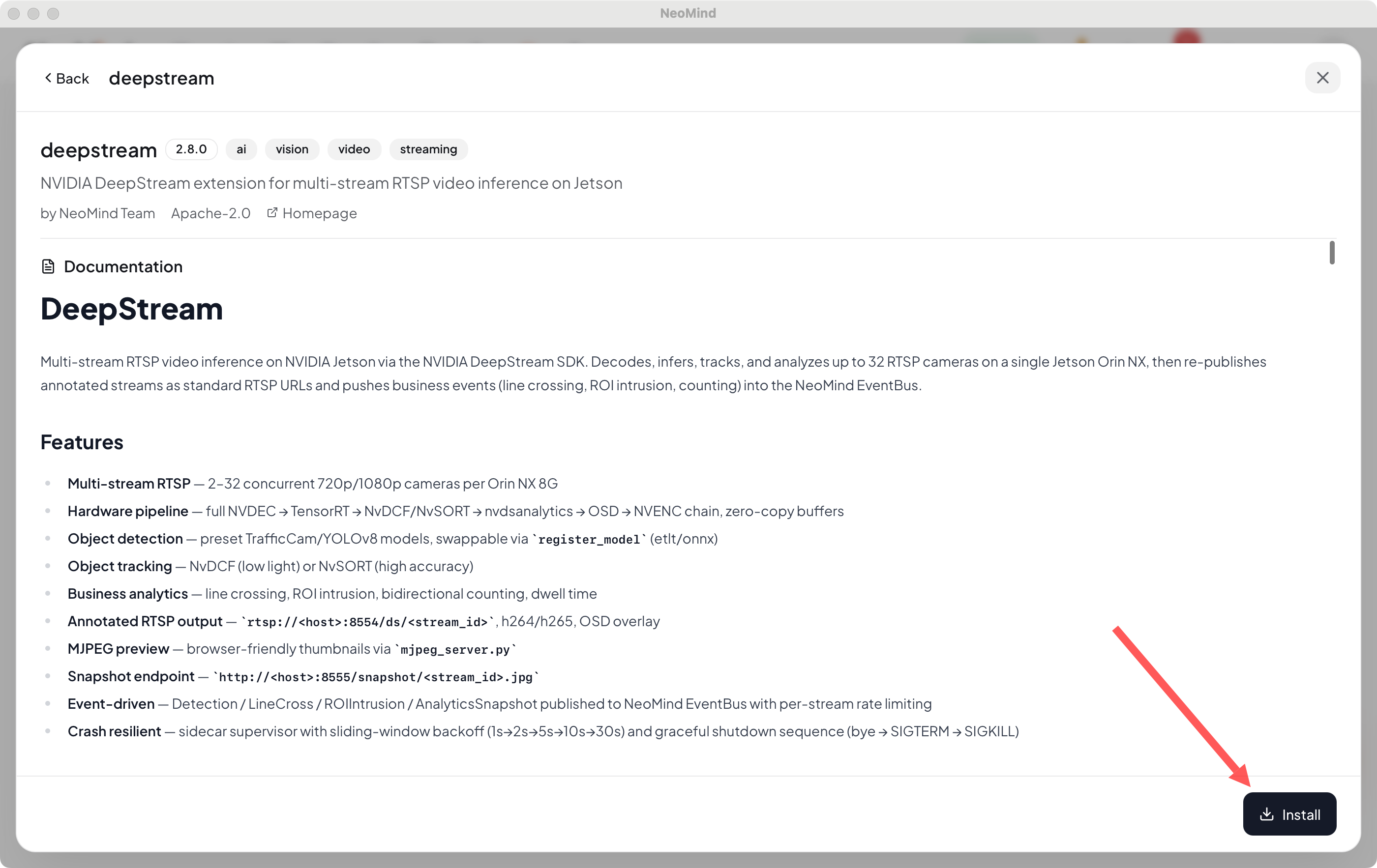
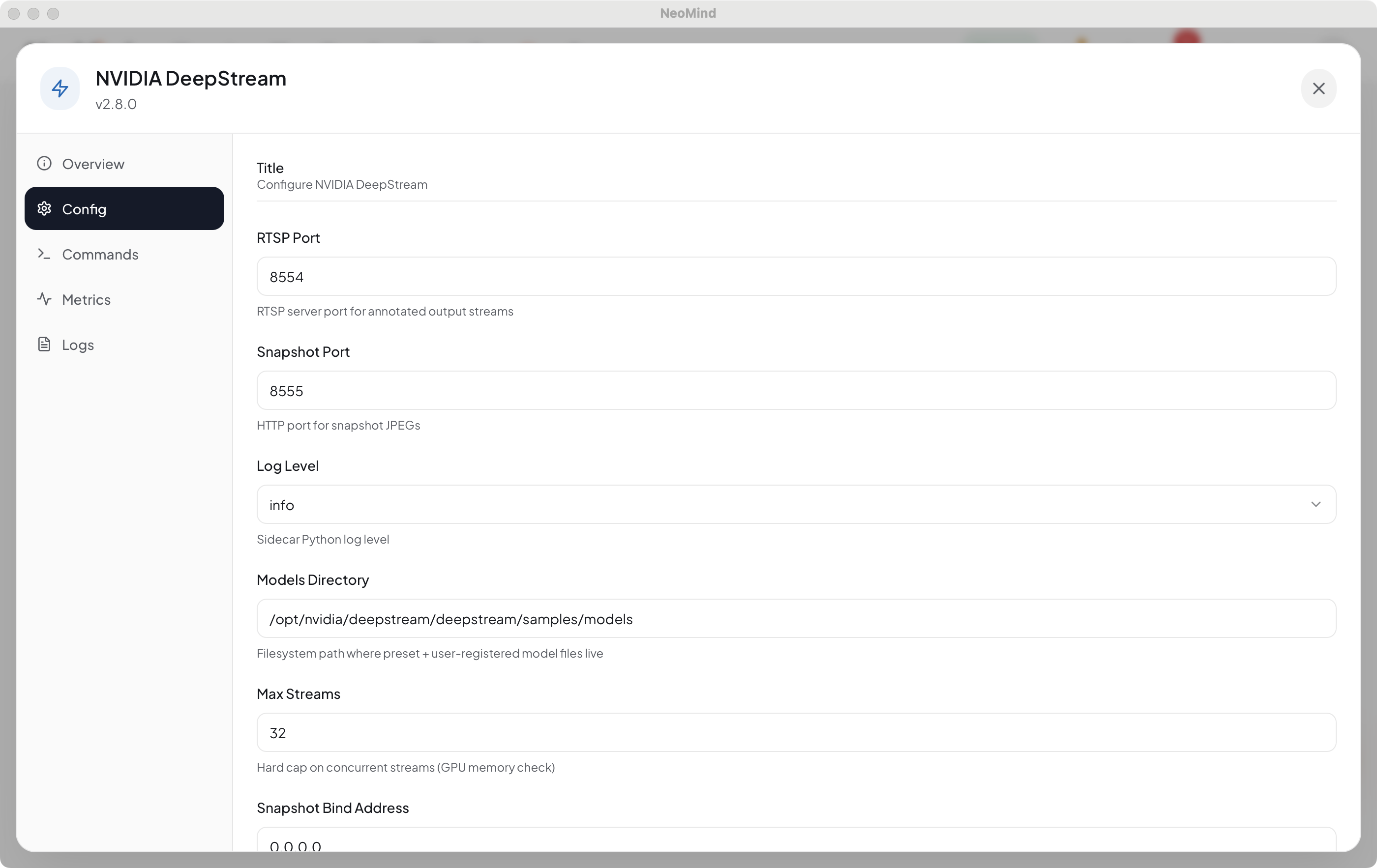
6. Add a video stream
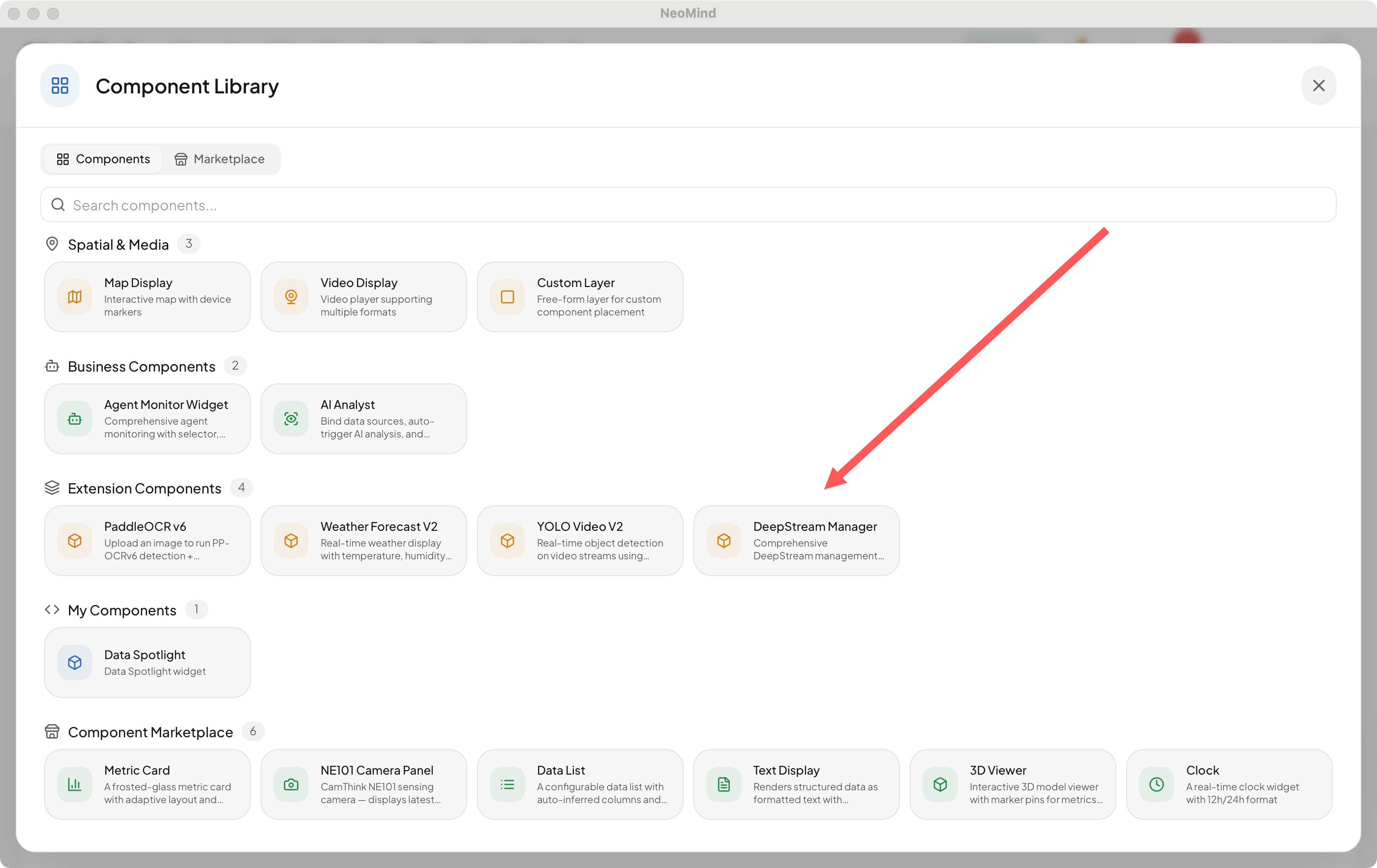
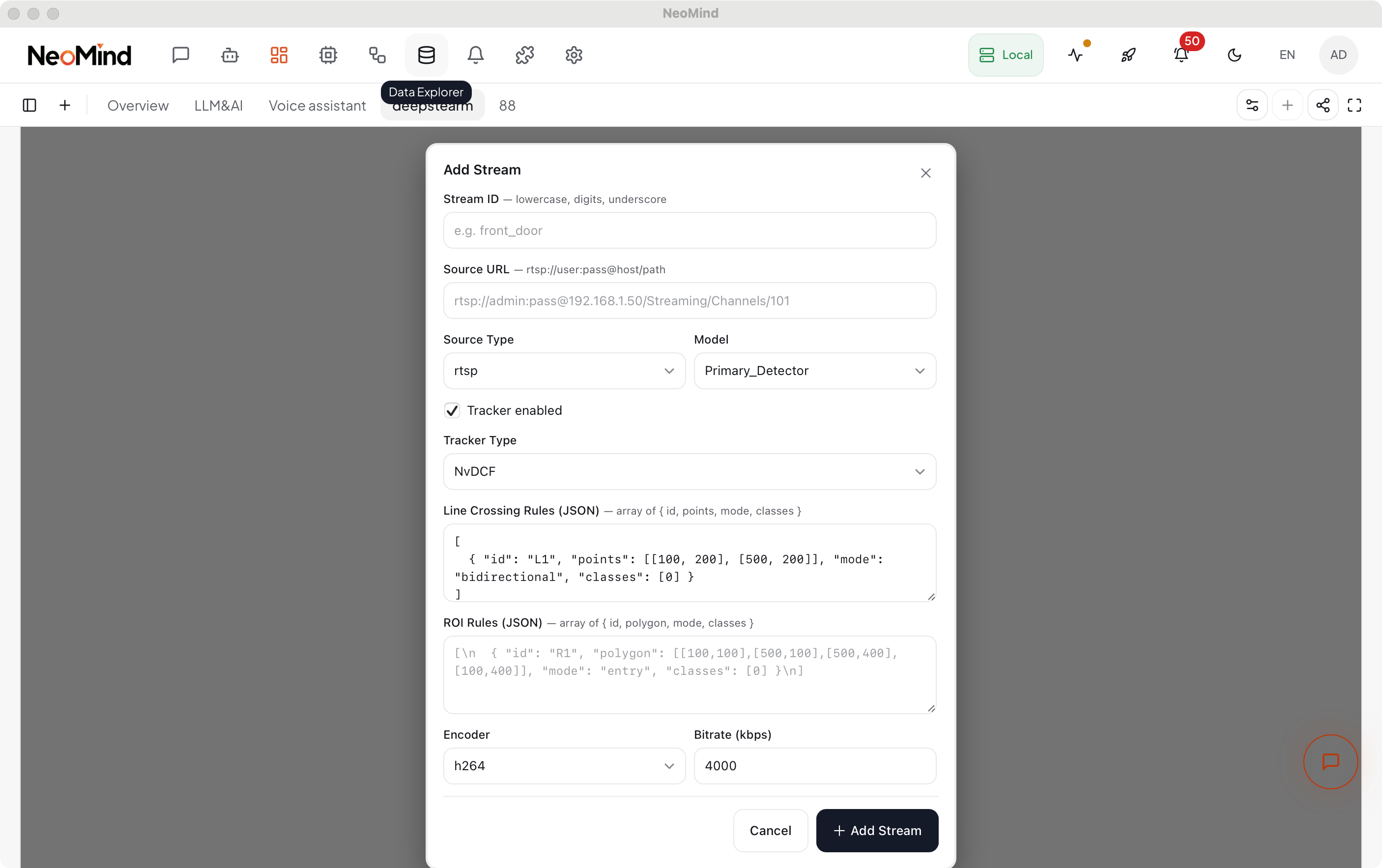
Add the deepstream extension's DeepStreamManagerCard to the Dashboard (the DeepStream panel); click Add Stream, providing per stream:
| Field | Example | Description |
|---|---|---|
stream_id | cam1 | Stream identifier, used in output URLs and events |
source.url | rtsp://admin:pass@10.0.0.10/Streaming/Channels/101 | RTSP source (TCP transport recommended on Jetson) |
model | Primary_Detector | Preset TrafficCam / YOLOv8; swap via register_model (etlt/onnx) |
tracker | NvDCF / NvSORT | NvDCF for low light, NvSORT for high accuracy |
analytics | line crossing / ROI polygons | Define analytics regions |
On save, the sidecar builds the pipeline and begins inference and event emission.
Add the DeepStream panel and a video stream:
7. View results
- Panel status bar: the top bar shows service status, GPU usage, FPS, and stream count; refresh or restart the service from here.
- MJPEG thumbnails: live multi-stream preview (with detection boxes) in the panel; click a thumbnail to open the detail drawer — HLS live video, per-class counts (object / meta / class), and an event log, with copy-RTSP and delete-stream actions.
- Annotated RTSP:
rtsp://<server_host>:8554/ds/<stream_id>— play in any player or record. - JPEG snapshot:
http://<server_host>:8555/snapshot/<stream_id>.jpg. - Business events: Detection / LineCross / ROIIntrusion / AnalyticsSnapshot enter NeoMind — show on the dashboard, trigger alerts / pushes via Automation Rules.
8. Typical Scenarios
- People / vehicle counting: multi-entrance cameras with real-time counts and time-of-day distribution.
- Line-crossing counting: draw a line at a gate / doorway for bidirectional (in/out) counting.
- Zone intrusion alerts: define a forbidden ROI; a target entering raises an event → automation push.
- Dwell analysis: track IDs across frames to measure how long targets stay in a region — useful for service-area / booth heat.
9. Appendix
Related docs
- NG4500 Series Overview
- DeepStream SDK on NG4500
- Object Detection Use Case
- Extension Management
- Automation Rules
- deepstream extension INSTALL.md
Last updated: 2026-07-24