System Settings
Click Settings at the bottom of the sidebar to open the settings panel — five sections: LLM Backends, Device Connections, IM Channels, Preferences, and About. LLM backends are covered in Configure LLM Backend, device connections in Device Onboarding, IM channels in AI Chat — IM Bridges. This page covers the rest.
Preferences
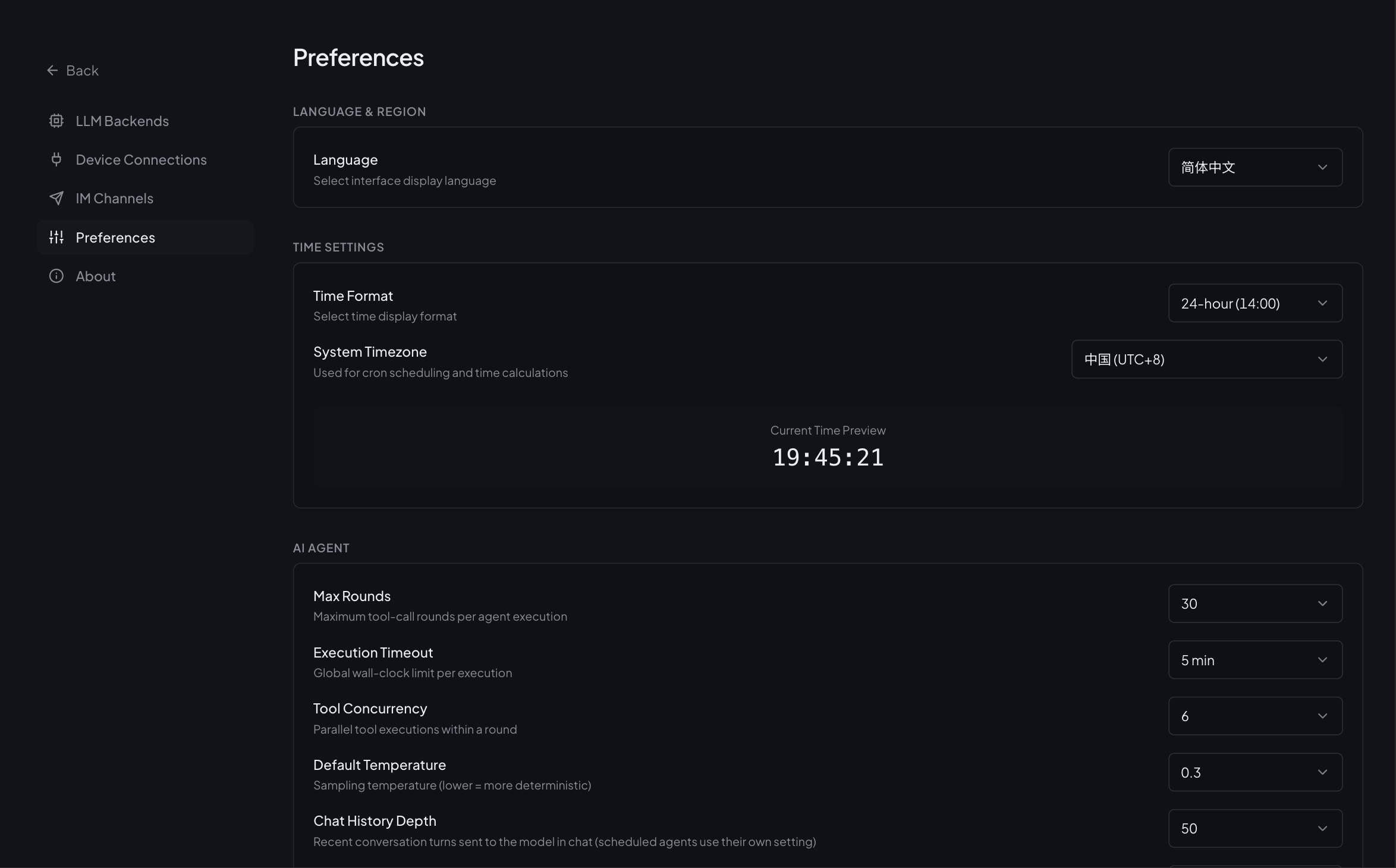
Language & Region
| Setting | Description |
|---|---|
| Language | UI language (简体中文 / English), applies immediately |
| Time Format | 12-hour / 24-hour |
| System Timezone | Used for cron scheduling and all time calculations — changing it shifts rule trigger times |
AI Agent Defaults
Global defaults for new agents and AI Chat (individual agents can override in the editor):
| Setting | Default | Description |
|---|---|---|
| Max Rounds | 30 | Maximum tool-call rounds per agent execution |
| Execution Timeout | 300 s | Timeout for a single execution |
| Default Temperature / Top-P / Thinking | per model | Sampling defaults; Thinking = auto follows model capability |
| Tool Concurrency | 6 | Concurrent tool calls |
| Chat History Depth | — | Conversation turns carried as context |
| Compaction Model | Session model | LLM instance used to summarize conversation history as context fills up. "Session model" = each conversation's own model; point it at a smaller, faster instance to keep compaction from competing with the main model (falls back to the session model if the instance is unavailable) |
Device Defaults & Data Retention
| Setting | Description |
|---|---|
| Default Offline Timeout | How long a device goes silent before marked offline (default for new devices) |
| Default Retention | Telemetry retention: never (forever) / 12h / 1d / 3d / 7d / 30d / 90d |
| Auto Cleanup + Cleanup Now | When enabled, expired data is purged automatically; Cleanup Now runs a pass immediately |
Once a retention period applies, telemetry older than it is physically deleted and unrecoverable. Pair it with automatic backups for anything important.
Chat Session Retention
Retention for AI Chat session records (session_retention_hours): forever by default. Once set, the server prunes expired sessions every hour, keeping sessions.redb from growing without bound on long-running edge deployments.
Expired sessions and their messages are physically deleted and unrecoverable; export anything you need to keep, or raise the retention window.
Backup Schedule
| Setting | Description |
|---|---|
| Backup Enabled | Toggle automatic backups |
| Interval | 6 h / 12 h / 1 d / 2 d / 7 d |
| Keep | Retention count (1 / 2 / 3 / 5 / 7 / 14) |
| Back up now | Run a backup immediately |
What gets backed up, where it is stored, and how to restore: Troubleshooting — How do I back up?.
Memory Limits
Character limits for the USER.md / KNOWLEDGE.md / PROCEDURES.md memory files (defaults 2000 / 3000 / 3000). Oldest entries are pruned automatically; the files themselves are viewable and editable in AI Agent → Memory.
Auto-Onboarding
When enabled, data from unknown devices lands in the pending list with a suggested device type (up to 10 samples collected by default). When disabled, unknown-device data is discarded. The full flow: Device Onboarding — Pending.
Extension Marketplace Source
The marketplace index is fetched from GitHub by default. For restricted networks, switch the mirror here (or via the NEOMIND_EXTENSION_MARKET_URL env var) — the next marketplace request uses it, no restart needed. Precedence: saved setting > NEOMIND_EXTENSION_MARKET_URL env var > built-in default — if the env var is set, saving in the UI silently overrides it. Package integrity is verified against the mirror's artifacts.
About
- Version & self-upgrade: shows the current version; browser deployments can upgrade in place (download → verify → backup → restart, fully automatic) — see Install — Upgrade
- Resource panel: CPU / memory / disk usage at a glance
- Download logs: bundle run logs for troubleshooting
Next Steps
- Troubleshooting — start here when something breaks
- CLI & API Keys — script the same capabilities
Last updated: 2026-10-21